Why would we need to limit bandwidth on cisco switch ?
I never think why until my friend ask me how to do that couple of times (may 2 months ago). Here is a sample scenario and configuration on cisco switch to limit interface bandwidth.

As you can see on figure 1, we need to connect Customer LAN in building A to LAN building B. We need to limit their bandwidth to for example 256Kb because customer pay less $ in amonth. Ok, lets jump to configuration detail. We will skip in depth discussion of QoS and how it works (check Cisco QoS for detail).
We need globally enable QoS with the “mls qos” configuration command. This command will enable QoS on all ports with default settings. “mls qos” is the key, without it, our next steps will be use less.
SW(config)#mls qos
I never think why until my friend ask me how to do that couple of times (may 2 months ago). Here is a sample scenario and configuration on cisco switch to limit interface bandwidth.

As you can see on figure 1, we need to connect Customer LAN in building A to LAN building B. We need to limit their bandwidth to for example 256Kb because customer pay less $ in amonth. Ok, lets jump to configuration detail. We will skip in depth discussion of QoS and how it works (check Cisco QoS for detail).
We need globally enable QoS with the “mls qos” configuration command. This command will enable QoS on all ports with default settings. “mls qos” is the key, without it, our next steps will be use less.
SW(config)#mls qos
Define criteria to select traffic for policing, define a class-map to select traffic using defined criteria, define a service-policy using class, and applying a policer to the specified class.
SW(config)#class-map all_traffic
SW(config-cmap)#match ip dscp 0
SW(config-cmap)#exit
SW(config)#policy-map limit_256
SW(config-pmap)#class all_traffic
SW(config-pmap-c)#police 256000 32000 exceed-action drop
SW(config-pmap-c)#
Apply a service policy to a port
SW(config)#int fa0/13
SW(config-if)#service-policy output limit_256
SW(config-if)#service-policy input limit_256
OK, we are done !
We need to check whether what we have done already work properly or not.
SW#sh policy-map int fa0/13 | i rate
30 second offered rate 0 bps, drop rate 0 bps
30 second rate 0 bpsqm_police_inform_feature: CLASS_SHOW
30 second offered rate 0 bps, drop rate 0 bps
30 second rate 0 bpsqm_police_inform_feature: CLASS_SHOW
SW#
It’s normal that we don’t see any traffic count with above command on switch, but if we issue above command on router and no traffic counted, then be aware, maybe you missed something. Otherwise, the following command will show you some counter (if configuration work).
SW#sh mls qos int fa0/13 statistics
FastEthernet0/13
Ingress
dscp: incoming no_change classified policed dropped (in bytes)
Others: 208054281 192207476 15846805 0 4398
Egress
dscp: incoming no_change classified policed dropped (in bytes)
Others: 368212302 n/a n/a 0 4593
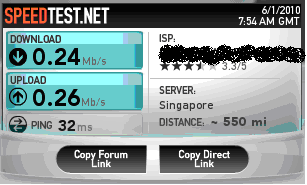
Finally, here is test result to speedtest…
SW(config)#class-map all_traffic
SW(config-cmap)#match ip dscp 0
SW(config-cmap)#exit
SW(config)#policy-map limit_256
SW(config-pmap)#class all_traffic
SW(config-pmap-c)#police 256000 32000 exceed-action drop
SW(config-pmap-c)#
Apply a service policy to a port
SW(config)#int fa0/13
SW(config-if)#service-policy output limit_256
SW(config-if)#service-policy input limit_256
OK, we are done !
We need to check whether what we have done already work properly or not.
SW#sh policy-map int fa0/13 | i rate
30 second offered rate 0 bps, drop rate 0 bps
30 second rate 0 bpsqm_police_inform_feature: CLASS_SHOW
30 second offered rate 0 bps, drop rate 0 bps
30 second rate 0 bpsqm_police_inform_feature: CLASS_SHOW
SW#
It’s normal that we don’t see any traffic count with above command on switch, but if we issue above command on router and no traffic counted, then be aware, maybe you missed something. Otherwise, the following command will show you some counter (if configuration work).
SW#sh mls qos int fa0/13 statistics
FastEthernet0/13
Ingress
dscp: incoming no_change classified policed dropped (in bytes)
Others: 208054281 192207476 15846805 0 4398
Egress
dscp: incoming no_change classified policed dropped (in bytes)
Others: 368212302 n/a n/a 0 4593
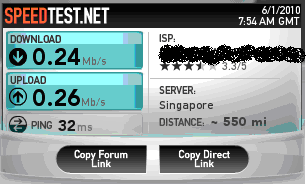
Finally, here is test result to speedtest…